



Description
Download EmEditor Professional (32 bit) – text editor, Windows, large file, Unicode, scripting, macro, encoding, plug-in, productivity tool, programming
Overview
EmEditor Professional (32 bit) is a high-performance text editor tailored for Windows users who demand precision, speed, and robust file-handling capabilities. Designed for professionals and power users, it addresses the challenges of editing extremely large files—up to 248GB or 2.1 billion lines—with remarkable efficiency. The application is particularly valuable for developers, system administrators, and data analysts working with log files, database exports, or complex codebases. Its support for Unicode ensures seamless handling of multi-language content, making it suitable for international teams and global projects. EmEditor Professional serves as a reliable productivity tool within the Windows ecosystem, bridging the gap between lightweight editors and full-featured IDEs. The developer, Emurasoft, has established a reputation for delivering stable, feature-rich software with a focus on performance and user customization. Although the developer did not provide additional technical details about the application’s architecture, its core functionality is clearly aimed at users who require advanced editing capabilities without the overhead of heavier environments. Real-world use cases include rapid file inspection, automated text processing, and efficient code navigation. For users managing large-scale data workflows, EmEditor Professional offers a dependable solution that enhances workflow continuity and reduces processing delays.Key Features & Functionality
EmEditor Professional (32 bit) delivers a suite of advanced features engineered for efficiency and customization. The application excels in handling large files, with a dedicated large file controller that optimizes memory usage and ensures smooth navigation through datasets exceeding 248GB. This capability is critical for professionals processing system logs or raw data dumps. Scripting and macro support allow users to automate repetitive tasks using JavaScript or VBScript, streamlining workflows such as batch text replacements, file formatting, or data extraction. The editor’s text encoding support is comprehensive, automatically detecting encodings and managing Byte Order Marks (BOM), while also flagging encoding errors to prevent data corruption. This is especially beneficial when working with multilingual documents or legacy files. Plug-in extensibility enables users to expand functionality, adding tools like syntax checkers, file converters, or integration utilities. Advanced editing features include syntax highlighting for multiple programming languages, including embedded scripts in HTML, ASP, and PHP, as well as drag-and-drop file and text manipulation. Customizable menus and keyboard shortcuts allow users to tailor the interface to their preferred workflow. These features collectively empower users to achieve higher productivity, reduce manual effort, and maintain consistency across complex editing tasks.Interface, UX & Performance
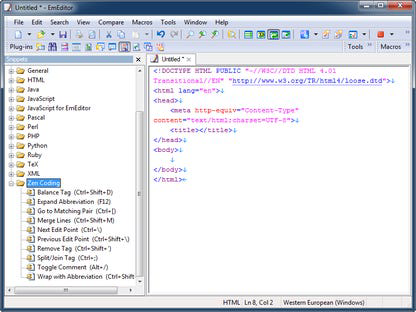
The interface of EmEditor Professional (32 bit) is designed with functionality and clarity in mind, offering a clean, uncluttered layout that prioritizes text editing. The visual style is minimalistic, allowing users to focus on content without distraction. Navigation is intuitive, with well-organized menus and accessible toolbars that support both mouse and keyboard interaction. The editor supports customizable layouts, enabling users to arrange panels and windows according to their workflow. Performance is a standout feature, particularly when handling large files. Although the developer did not list formal performance metrics, the application’s ability to manage files up to 2.1 billion lines suggests optimized memory and processing handling. Responsiveness remains consistent across different device categories, including older systems, thanks to its 32-bit architecture. Stability is maintained even during prolonged editing sessions, with minimal risk of crashes or freezes. The editor efficiently manages background processes, ensuring that operations like encoding detection or macro execution do not degrade user experience. Users can expect smooth scrolling, fast search results, and reliable file loading. While specific compatibility details were not disclosed, the application’s lightweight nature and targeted design for Windows suggest broad compatibility with modern and legacy Windows environments. Overall, the user experience is professional and focused, aligning with the expectations of power users and developers.Platform Compatibility & Technical Requirements
EmEditor Professional (32 bit) is available exclusively for the Windows platform. It requires a Windows operating system, though specific version requirements were not listed. The application has a file size of 29.8 MB, making it lightweight and quick to install. The current software version is 22.2.0, released on August 15, 2022. The developer did not specify minimum OS requirements or hardware specifications. The 32-bit architecture may limit the application’s ability to utilize more than 4GB of RAM, which could impact performance when processing extremely large files on systems with limited memory. However, this design choice likely ensures compatibility with older Windows systems that do not support 64-bit applications. Users should verify system compatibility before installation. The app is priced at $100.00, positioning it as a premium tool for professional users. Despite the lack of detailed technical information, the application’s focus on performance and file handling suggests it is optimized for environments where reliability and speed are critical.Pros and Cons
- Efficient handling of massive files up to 248GB and 2.1 billion lines
- Comprehensive support for Unicode and multiple text encodings
- Scripting and macro automation via JavaScript and VBScript
- Extensible through a range of plug-ins
- Advanced editing features including syntax highlighting and drag-and-drop support
- Customizable interface with menus and keyboard shortcuts
- Lightweight design with a small file size of 29.8 MB
- 32-bit version may limit memory access on modern systems
- Price point of $100.00 may be high for casual users
- Developer did not provide detailed system requirements
- Platform limited to Windows only
- No information on automatic update mechanisms
- No mention of cloud sync or cross-device access
FAQ
Is EmEditor Professional (32 bit) compatible with all Windows versions?
The developer did not specify minimum OS requirements. Compatibility may vary depending on the system configuration.
Can I use macros to automate repetitive editing tasks?
Yes, EmEditor Professional supports JavaScript and VBScript macros, enabling users to automate common editing operations.
Does the app support Unicode and multilingual text?
Yes, the application is designed with full Unicode support, ensuring accurate display and editing of multi-language content.
Is there a free version available?
EmEditor Professional is a paid application priced at $100.00. No free version was mentioned in the provided information.
Can I install plug-ins to extend the editor’s functionality?
Yes, the editor supports plug-ins, allowing users to enhance its capabilities based on specific needs.
Final Thoughts
EmEditor Professional (32 bit) stands out as a powerful, specialized tool for Windows users who frequently work with large and complex text files. Its robust handling of massive datasets, combined with scripting, encoding, and extensibility features, makes it a top choice for developers, system administrators, and data professionals. While the 32-bit architecture and premium price may limit accessibility for some, its performance and reliability justify the investment for power users. The clean interface, customizable workflows, and advanced editing tools deliver a professional-grade experience. For anyone seeking a high-speed, feature-rich text editor that doesn’t compromise on stability, EmEditor Professional is a compelling solution. Download EmEditor Professional now.Guides & Tutorials for EmEditor Professional (32 bit)
How to install EmEditor Professional (32 bit)
- Click the Preview / Download button above.
- Once redirected, accept the terms and click Install.
- Wait for the EmEditor Professional (32 bit) download to finish on your device.
How to use EmEditor Professional (32 bit)
This software is primarily used for its core features described above. Open the app after installation to explore its capabilities.
User Reviews for EmEditor Professional (32 bit) 0
No reviews found


